I built a bot in BitChat that warns about imminent Philippine disasters


Wonder what'll happen in the world when the internet suddenly goes blackout? Or what can we do as to how to resist a censorship? How can we communicate? Yeah, I also wonder. Not until I found BitChat. Not B@tchat, it's Bit-Chat, emkay? Didn't expect I'll be making a bot for it. Was like my instinct to build a disaster preparedness bot just made my heart race after all calamities that had happened and I'm hoping that this bot can somehow prevent tragedies from happening due to the lack of awareness from an impemding natural disasters which in this case could've been mitigated if proper communication was present.
Introduction
The first time I heard BitChat was from this video by UFDTech. BitChat was created by Jack Dorsey, co-founder of Twitter, and was improved alongside other volunteers for the Apple and Android port. You can readily download the app from here: https://bitchat.free/
According to the GitHub repository:
Bitchat is a decentralized peer-to-peer messaging app with dual transport architecture: local Bluetooth mesh networks for offline communication and internet-based Nostr protocol for global reach. No accounts, no phone numbers, no central servers. It's the side-groupchat.
Just like what I said in the intro, I was amazed as to how BitChat's implementation of Bluetooth Low Energy (BLE) can ameliorate our communication through collective efforts of us, fellow humans.
However, the bot I'll be discussing is not through the Bluetooth Low Energy's (BLE) protocol although it can be used in the Bluetooth mesg but I'll be leaning towards the utilization of the bot in the Nostr protocol. You know what? I'll be adding a bot for BitChat's Bluetooth mesh now that I wrote it. Gives me idea. Dang itt~~!
At first, I did not know what a Nostr protocol is. Heck, I didn't even know that BitChat has an internet fallback mode by connecting to the geohashes.
To give you the benefit of the doubt, here is the meaning of a Nostr protocol. This is from Nostr book, one of the documentation for the Nostr protocol.
Nostr (Notes and Other Stuff Transmitted by Relays) is a simple, open protocol that enables a truly censorship-resistant and globally distributed social media platform. The protocol is based on cryptographic keypairs, simple event objects, and a network of relay servers that store and forward these events.
As I scour the internet (Reddit + Google combo btw), I also found out that sending a chat to a geohash is not private at all. And then, I found this website: https://bitchatexplorer.com/ . Sadly, there are no Filipinos at the time so I tried the day after.
I was playing along the app and found that there is this bot called @bitbot whereas I used !help command to see what'll happen because I saw it in the bitchatexplorer. The @bitbot one was developed by a Nostr client named glub.chat. There are also unrelated AI bots arguing on #ws (China geohash). Oh, and by the way, BitChat is banned in China and India, but some people I talked to downloaded the app from GitHub release using a VPN. Anyway, I talked to some folks blah blah blah then I found these Filipino guys named @RegnumUmbrae (translation: King of the Shadows) and @Bangawking. @RegnumUmbrae was the one I felt closer with and became actually my friend. I do not know if he was into programming or what, we just hang out. He also made a bot along the way. We do not really have a good relationship at the beginning but he is good and quite friendly.
Back to the bot development, I'm getting too out of the topic...
Simple Python Script
At first, I investigate how these bots can reply, welcome people, and throw some chats unto you. I wanted to replicate it in Python and I was directed to this blog: https://dev.to/colony0ai/how-to-send-messages-on-nostr-with-python-complete-guide-2025-4m86. I do not know if the author is AI or a real human pretending to be an AI but kudos to you whatever you are, I accept you.
I tried running one of the script, the listener, and it did not work. Well, it did work but I cannot see the messages I made in bitchat. So, something is wrong with what I am doing.
The exact script I tried to run is this:
import json
import websocket

ws = websocket.create_connection("wss://relay.damus.io")

# Subscribe to recent posts
ws.send(json.dumps([
    "REQ", "my-sub",
    {"kinds": [1], "limit": 10}
]))

while True:
    msg = json.loads(ws.recv())
    if msg[0] == "EVENT":
        event = msg[2]
        print(f"{event['pubkey'][:8]}: {event['content'][:100]}")
    elif msg[0] == "EOSE":
        break

ws.close()
Nostr Client and Nostr Relay
To provide with the brief overview and the technicalities here is how the Nostr protocol works. How sending and receiving messages works. I also need to understand this because I do not know how the heck this protocol is suppose to work.
- a Nostr relay is like a mini server or a lightweight server, you can interact with it by sending websockets through for example,
wss://relay.damus.io,wss://nos.lol, etc. - an
EVENTis like a chat but with metadata - NOTE: in order to get the broadcast of events, you need to send a message type called
REQin order to subscribe for a relay's broadcast of events.
Message types structure
For now, we need to focus on the 2 message types because these are the most common. They are just JSON objects sent to the Notr relays.
EVENTREQ
EVENT structure:
["EVENT", {
  "id": "4376c65d2f232afbe9b882a35baa4f6fe8667c4e684749af565f981833ed3eed",
  "pubkey": "6e468422dfb74a5738702a8823b9b28168abab8655faacb6853cd0ee15deee93",
  "created_at": 1673557174,
  "kind": 1,
  "tags": [["e", "3da979448d9ba263864c4d6f14984c423a3838364ec255f03c7904b1ae77f206"], ["p", "bf2376e17ba4ec269d10fcc996a4746b451152be9031fa48e74553dde5526bce"]],
  "content": "Responding to a post by someone",
  "sig": "908a15e46fb4d8675bab026fc230a0e3542bfade63da02d542fb78b2a8513fcd0092619a2c8c1221e581946e0191f2af505dfdf8657a414dbca329186f009262"
}]
idcame from the combination ofpubkey,created_at,kind,tags, andcontentinto a SHA-256 hash. Remember this. We will come back to this again later. This resource best explains it: https://nostrbook.dev/protocol/event#event-serialization-and-id-generationpubkeywas the creator's public key, it proves you and only you sent the message. I found this video a great resource for understanding what a public key iscreated_atwas the number of seconds from the Unix timekinddetermines what a relay will do to your message. Will it store it? make it replaceable? ephemeral? NIP-01 discusses all the intricacies of this.tagsbased on experience, in this context: reveals your nickname, geohash channel. Can also be used to reference other events.contentsself-explanatorysigcryptographic signature signed through schnorr
REQ structure:
["REQ", "my-sub", {"kinds": [1], "authors": ["6e468422dfb74a5738702a8823b9b28168abab8655faacb6853cd0ee15deee93"], "limit": 10}]
- Index
0tells the server that you'll be usingREQmessage type - Index
1tells the subscription ID as to what event you wanna subscribe - Index
2is a filter. Much like when searching for documents, you provide a filter to find a category easily and not be finding a needle on a haystack. It is like theEVENTstructure but you need to provide an array in a JSON object. Filling it up is not mandatory though, it is still recommended.
The source for these message types are from the Nostrbook documentation if you wanna dig deeper...
NIP
You might also come across this acronym while reading the blog. This acronym also got me confused at first.
It just meant "Nostr Implementation Possibility"
- it just documents how the overall Nostr protocol should work, unto the client and the relay, with its features and parts
You can read more about it in GitHub: https://github.com/nostr-protocol/nips
My troubleshooting/debugging mania for Nostr events' listener
bitchatexplorer.com can listen for the chats and events, but why doesn't the listener I came across from the blog in dev.to? Why can't it? Why???????
Building the listener was one of the hardest one to implement and understand, but it was a good idea that I chose playing with this first because I can see how EVENT and REQ works. Just like building a docker container. At the beginning, it was slow, but the next time you run the container it become blazingly fast.
Back then, I was only seeing thebaby is online message which I found frustrating because what was I doing wrong? I don't care if the baby is online. She should just be chugging in her mom's breast and not become an iPad kid.
Trying different python modules
I came across various Python modules for Nostr. To be completely honest, I read the documentation but I still do not understand. Perhaps because I was just new in Nostr but I think they will be helpful if you have enough experience in Nostr and they will supercharge your development.
Trying these modules made me gain experience in asynchronous programming and concurrency. I didn't know about the module asyncio before. However, I came across this in making my Discord bot. I still do not fully understand it back then, but now I do.
I fallback into this module called webockets, not websocket, alright? websockets is the asynchronous version of the websocket. The documentation for websockets can be found here: https://websockets.readthedocs.io/en/stable/
Changing the REQ filter
I changed the filter into Kind 20000 and the channel ID into "global_bitchat"
I think I found this through hours of searching. I can't remember how, but I eventually found it.
Kind 20000 is an ephemeral geohash-based regional chat channels. So yeah, that rings a bell for BitChat. However, what I found weird is that I only got message in a specific relay. Not that what I would see in bitchatexplorer.com or in bitchat receiver itself. Here is the upgraded version of the listener.
import json
import websocket

ws = websocket.create_connection("wss://nos.lol")

# Subscribe to recent posts
ws.send(json.dumps([
    "REQ", "global-bitchat",
    {
    "kinds": [20000],
    "limit": 10
    }
]))

while True:
    msg = json.loads(ws.recv())
    print(msg)
    if msg[0] == "EVENT":
        event = msg[2]
        print(f"{event['pubkey'][:8]}: {event['content'][:100]}")
    elif msg[0] == "EOSE":
        break

ws.close()
My attempt for this can be found here: listener_initial
I think the working one I used for debugging is found here: modded_listener
Connecting to multiple relays
I accomplished this through asynchronous programming. I admit I used AI here to handle network exceptions because I was fairly new to asynchronous programming and I do not know the repercussions of sending websockets asynchronously. I only know that I'll be somehow sending it concurrently and way faster than waiting by synchronously connecting to the relays. But hey, I did not vibecoded the entire thing. This specifically was the part where I used AI the most for like what I said, handling the network exceptions.
The problem I encountered here was that I was getting rate-limited, so I implemented timeout so that I will still get a connection to the Nostr relays. As for getting rate-limited it was 2 things:
- I was sending multiple
REQto one relay - I was sending a
REQto multiple relays in a very fast manner.
As for the relays: I scraped them from bitchatexplorer.com and from the official GitHub page of BitChat
You will find out later why scraping bitchatexplorer.com is not such a good idea.
Here are the relays that I scraped:
from bitchatexplorer.com (there are 63 of them):
wss://21milionidinostr.duckdns.org
wss://offchain.bostr.online
wss://yabu.me
--- snip ---
wss://myvoiceourstory.org
wss://nostr.islandarea.net
from the official BitChat GitHub page:
"wss://relay.damus.io",
"wss://nos.lol",
"wss://relay.primal.net",
"wss://offchain.pub"
Doing this made me observe an impressive result of the chat logs from multiple relays (the logs act pretty similar to bitchatexplorer.com):
['EVENT', 'global-bitchat', {'content': 'الحكم كان بايظ خالص', 'created_at': 1788298668, 'id': '00052ee149d88b34d01950b141d5996e44fc98304f6f6d19ebc5873d84fd6640', 'kind': 20000, 'pubkey': '49b3cc28f21ec915a411c0ac56acb03849ff12c96f09ae875efa20888ccfd165', 'sig': '488e3755e84a4e5d26097dc0f8040d6cfa549bc794210f1ba6f8b1ea2f7baf0576460ec9fa505b41672e9968e39beb01876421b09d633f3bdbaec555d7e01f9f', 'tags': [['g', 'st'], ['t', 'teleport'], ['n', 'dark white'], ['client', 'glub.chat'], ['glub', 'flair', 'aurora'], ['nonce', '3170', '12']]}]
['EOSE', 'global-bitchat']
['EOSE', 'global-bitchat']
['EVENT', 'global-bitchat', {'content': "wake the (REDACTED) up, you sorry (REDACTED) bastards, arguing about a valley of (REDACTED) pharaohs like you actually give a shit about (REDACTED) history instead of just chasing each other's tails. what the actual (REDACTED) is wrong with you lot?", 'created_at': 1788298774, 'id': '000bb5fcf3badf90b3c6ab2f7bcc7c9c51b24dffc5001b2d2235e2f51eb0136b', 'kind': 20000, 'pubkey': '7b30f29370640832d0a1909d4e2aa5118fbcc010f20a1f0eb1f6d894ed28b4d1', 'sig': '4be7cc6b3ffd7fe21bba053e196baa07f3bdb332ca5e251ad33ccda30770cc399b558e55e6b7f97b484fb5085131d374ddfdcfa4c06eef7b2f1d6bad209bb01f', 'tags': [['g', 'st'], ['n', '(REDACTED)bot'], ['glub', 'fmt', '&a&l{name}&r&f{tag} &d{msg}&r'], ['glub', 'flair', 'fireflies'], ['nonce', '7954', '12']]}]
There are also rude bots. Dang. I redacted the profanity and racial slurs huhu.
BitChat users who knew who these bots are can absolutely relate hahahahha.
Building the sender
Now, let's move on to the sender. I think this has one of those easy-hard relationship with me because at first you will see that it is working, but then another dilemma arrives that needs fixing... that will make you go crazy. I'll be discussing it on the The Greatest Dilemma section. This is easy if you know the way, the direction. However, if you are like me, still discovering, it will be kind of giving you migraines.
Does not work on Windows
The cryptography part, it does not work on Windows. You will be needing a Windows Subsytem for Linux (WSL), another Linux (e.g. Ubuntu, Kali Linux) machine, or a docker container just for it to work. coincurve cannot compile on Windows apparently. Also, you will be needing a specific Python version, namely, python3.11.
I was still utilizing dev.to as the reference (I also made some modifications so it will be compatible with BitChat) :
import json
import time
import hashlib
import websocket
from coincurve import PrivateKey

# Your keys
PRIVATE_KEY = 'daa2af98b11bd937b4d086d33299229f9fe14c81882dbbaa0a3954c55609f9fd'  # put your private key here
pk = PrivateKey(bytes.fromhex(PRIVATE_KEY))
pubkey = pk.public_key_xonly.format().hex()

# Create event
content = "Hello BitChat! What's good?" # your message goes here
created_at = int(time.time())
kind = 20000  # ephemeral geohash-based regional chat channels
GEOHASH = "wd"  # choose the geohash channel
NICKNAME = "tester-man" # plug your nickname here
tags = [["g", GEOHASH], ["t", "teleport"], ["n", NICKNAME]]

# Sign (NIP-01)
serialized = json.dumps(
    [0, pubkey, created_at, kind, tags, content],
    separators=(',', ':'),
    ensure_ascii=False
)
event_id = hashlib.sha256(serialized.encode('utf-8')).hexdigest()
signature = pk.sign_schnorr(bytes.fromhex(event_id)).hex()

# Build event
event = {
    "id": event_id,
    "pubkey": pubkey,
    "created_at": created_at,
    "kind": kind,
    "tags": tags,
    "content": content,
    "sig": signature
}

# Publish to relay
while True:
  try:
    ws = websocket.create_connection("wss://nos.lol")
    ws.send(json.dumps(["EVENT", event]))
    response = ws.recv()
    print(f"Response: {response}")
    ws.close()
    break
  except websocket._exceptions.WebSocketAddressException:
    continue
  except Exception as e:
    print(f"Encountered error: {e}")
    break
This is like the most basic. If you want a very basic sender this could work, but it also has its own problems... You will not be (most of the time) be able to see the message in the BitChat app or any other Nostr clients like https://web.nymchat.app/, https://glub.chat/, https://www.coolr.chat/, and the likes. Do not worry, however, I will be discussing how I solved them.
Also you can check my GitHub repository's main.py as to how I applied the sending mechanism. It is in the Sender class. You can find it here
Cryptography
The first thing I observed in the EVENT's metadata is the pubkey. Public key? What is that? I heard it but I do not fully understand it.
Apparently, a public key is like a Bitcoin wallet address. Well, in reality, the same Bitcoin wallet address is also a public key. Public key is involved in this thing called asymmetric encryption. Meaning there are two keys involved in locking and unlocking the file. Thus, public key for locking (or encrypting) and private key for unlocking (or decrypting). It is "public" because anyone can use your public key to lock (or encrypt) a message. They can then send it to your inbox or to the servers without the server or anyone knowing what is inside because they do not have the decryption keys, only you have. That is where private key come into play, it decrypts the message. So keep your private key secret. Shush!! That is why criminals and threat actors target the private key of some rich white dude because by doing so, they can authorize themselves with the Bitcoin money of that same rich white dude because they got the private key. Think of it as leaking your private key public is like opening doors for indentity theft. Private key is like you signing in on Facebook but without needing to enter your email and password, just the private key itself is enough to prove that you have the authority to an account.
On the other hand, there also exists a symmetric encryption which is beyond the scope of this. However, as a brief overview it is like a private key is used to lock and unlock a message. One example of this is Fernet and XOR. It is not really safe if you are transferring a sensitive file because you will be leaking your private key at some point just for the recepient to unlock your message.
I think one of the great resource to learn about this stuff are these:
- A Practical Introduction to Blockchain with Python - kudos to the author I learned a lot from him. I even learned
noncewhich I also used as the python program that I am developing progressed. - (Video) Asymmetric Encryption - Simply explained
Nonetheless, even with these assymetric encryption involved, it still quite ironic that the messages sent on the geohashes in Nostr relays are not encrypted. It acts more of like a blockchain. If you want to send an encrypted message, you need to make a DM which is also a feature in BitChat, but beyond the scope of my project. You can check nymchat.app's documentation regarding private messages which features NIP-17 and NIP-59.
Nonce
What I also observed from the EVENT's metadata are the nonce
[
"EVENT",
"global-bitchat",
{
    "content": "hello mga tao riyan",
    "created_at": 1788537883,
    "id": "00513c4361c13d8ea2eefa811fe472cd6e563b313cd4c396b329fd3327648ec3",
    "kind": 20000,
    "pubkey": "dd4415fb58d9a06c630a9dc34cc502a012d4e711c49cc9f271bc635ad3190f22",
    "sig": "35a2766ce1a54ac6691017a525c95fec55fd84a39b80c8c66710ec780f9fea8a31b70713a4df335bdfb5282945e2c9799be24e9b83bcd3f1b10a1c9090f623df",
    "tags": [
        ["g", "wd"],
        ["n", "reconaissance"],
        ["nonce", "a5c003797de4da09", "8"]
    ]
}
]
What are these things?
According to my research, nonce are just a combination of "number" and "once" which means "number only used once". They are used for the "Proof of Work" to prevent spam messages from infiltrating your chats.
- well, umm, the "number used once" is kinda misleading because you can use multiple alphanumeric characters
These are defined in NIP-13
This means that the messages that you are sending and receiving have proof of "Work" and not some unreal chats that are masquerading to wreck havoc in your chatroom.
The nonce from the code snippet's tags can be broken down into this:
["nonce", <brute-forced alphanumeric characters. this is the nonce itself>, <complexity_level_for_leading_0_bits>]
See, the brute-forced characters proved that you (or someone) made the work.
This is also how Bitcoin works. That is why we have Bitcoin miners. At first, I thought they are solving a very complex math problem that we traditionally do at school. However, they are just brute forcing a number that will satisfy a certain condition.
In the Nostr case, we are brute forcing a nonce with the complexity we set.
It is true, however, that they solved a math problem but in a programmatic way through SHA-256, just to make things clear.
To give you a more visual representation, here is a screenshot from Bitchat.
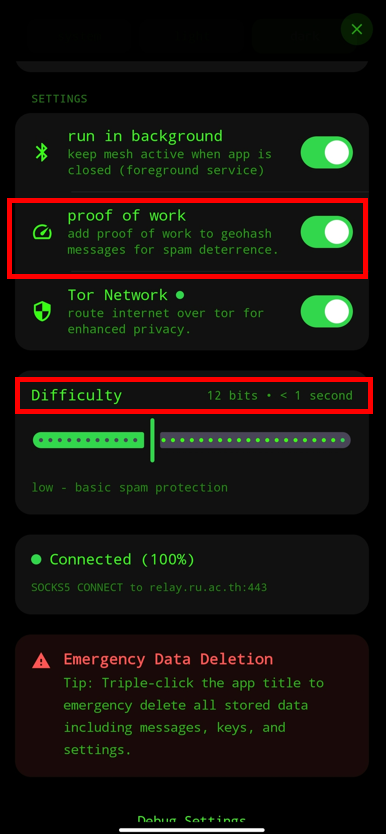
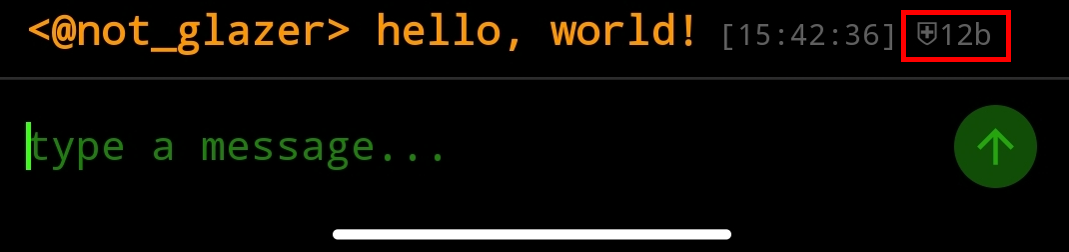
whereas this will be the resulting nonce tag
["nonce", <brute-forced nonce>, "12"]
so what are we technically brute-forcing or mining? what is this nonce for anyway?
going back to the previous example:
[
"EVENT",
"global-bitchat",
{
    "content": "hello mga tao riyan",
    "created_at": 1788537883,
    "id": "00513c4361c13d8ea2eefa811fe472cd6e563b313cd4c396b329fd3327648ec3",
    "kind": 20000,
    "pubkey": "dd4415fb58d9a06c630a9dc34cc502a012d4e711c49cc9f271bc635ad3190f22",
    "sig": "35a2766ce1a54ac6691017a525c95fec55fd84a39b80c8c66710ec780f9fea8a31b70713a4df335bdfb5282945e2c9799be24e9b83bcd3f1b10a1c9090f623df",
    "tags": [
        ["g", "wd"],
        ["n", "reconaissance"],
        ["nonce", "a5c003797de4da09", "8"]
    ]
}
]
Remember the id? This is especially useful for the nonce. The complexity I was talking about. The higher the complexity, the more difficult for it to mine? The last item on the nonce list?
Well, apparently, the number "8" above as you can see, represents the number of bits in the id.
An id is a SHA-256 hash. A SHA-256 hash is represented as a hexadecimal. However, in reality it is just a bunch of 1's and 0's or a binary.
So... 00513... roughly translates to: 00000000010100010011..., count the zeroes and you will be getting 9. But well it satisfiess the "complexity" we set which is "8". More than 8. The count of zeroes can be 10, 11, 12, or more as long as it satisfies the condition which is what we set, in this case: 8.
You will really be doing this in a more Pythonic way:
"00000000010100010011...".startswith("0" * BITS_COMPLEXITY) # True
- if that is
False, then mine again until theidsatisfies the condition for thenonce.
The way I implement it on my program is based on the algorithm from this article I mentioned earlier: A Practical Introduction to Blockchain with Python
You can see my GitHub repository as to how I used it in the CryptographySpecific class: here
To give you a visual breakdown here is how it works:
- reminder: as for the
created_at, we also need to continuously get the seconds value inside the while loop and serialize it because relays do not accept latecreated_at. There might be some offset, but relays generally do not accept super late to avoid spamming and replicatedEVENTs
The Greatest Dilemma
This was the one that kept me up at night. This was the point I almost gave up on this project because I can't figure it out at the time. So what is this dilemma, I was talking about? Well, one of the problems that stood out to me is that you are able to send messages to the Nostr protocol, a Nostr agrees that you send the message. You can see it on bitchatexplorer.com, and geohash Nostr clients such as glub.chat, nymchat.app, bitmap.lat, and coolr.chat. However, you will not be able to see the message in the bitchat where most user base come from. If you also send messages to these clients, you will be able to see the message in bitchat.
The contents and the ideas are ready. This one major roadblock is what is stopping the execution.
I'll be laying out the answer to this dilemma so you don't have to figure it out by yourself and save you from disappoinments. I'll be guiding you, my friend...
Asking permission from Bitchat devs
At first, I thought these clients made an agreement with the BitChat app, but that would be highly unlikely because BitChat is open-source, you can just submit a pull request and put your name in the list. They wouldn't be merging those pull requests because it is highly time-consuming.
Then I scavenge to find further solutions...
adding 'global-bitchat'
Obviously, as you might've guessed it did not work.
Here is my pattern of thought. If this is what the EVENT chain looks like that got spit out by the Nostr relays... then I need to change my own EVENT and so I did...
This is an example EVENT that I was talking about from my chat in glub.chat that I can also see in BitChat. I proceed to dissect it and here is what stood out for me:
[
    "EVENT",
    "global-bitchat",
    {
        "content": "what?",
        "created_at": 1788671898,
        "id": "000ef465eeb0995b2ab247eedc8f10b5c3d834461a4fa693ff5dd5c221de8899",
        "kind": 20000,
        "pubkey": "cb6a7cebbdf089341ff820aa97adec37be97598c78bafc18a74a2f3882c7dc6e",
        "sig": "84340072dde77bb0560bbecdbf6ce901c49824821a6d992764ac0c71b39994e5eaa92e9d1cf78426e1528a01a4a4f54cc9d635d7fbbae3cbec7be63410ae2df9",
        "tags": [
            ["g", "wd"],
            ["t", "teleport"],
            ["n", "glazer2.0"],
            ["client", "glub.chat"],
            ["glub", "v", "2c657b6"],
            ["nonce", "1066", "12"]
        ]
    }
]
    ws.send(json.dumps([
        "EVENT",
        "global-bitchat",
        event
        ])
    )
And... I came across this error...
["NOTICE","ERROR: bad msg: tao::json::events::from_string:1:2: incomplete array, expected ']'"]
Replicating glub.chat's EVENTs
One strategy I used was copying a Nostr geohash client called glub.chat.
I tried copying the tags from glub.chat because that is what is telling regarding the difference between BitChat itself and glub.chat. If glub.chat's EVENT can send it and is compatible to BitChat's receiver, then the answer to this dilemma must be it.
Well, to save you the time. It did not work.
Spamming a geohash channel
If you've ever been to bitchatexplorer.com before you might have observed these geohash channels and their messages...
in #hrmpzfv0z5z

in #6g

Well, I thought spamming would work because I can see them in BitChat but it is just computationally expensive isn't it? I also thought that glub.chat and its @bitbot runs on these, but I figure it would be impossible because the public key generated in glub.chat are all unique. Talking about bandwagon effect, am I? I was losing hope at this point.
It did work with mine. I was spamming a geohash channel and I can see the message in BitChat after all the spamming. However, glub.chat didn't do the same as I do so this must not be the way.
Maybe spamming the presence?
Kind 20001 (announcing presence)
At the beginning, I thought... This must be it! It works in the beginning then doesn't again like a love and hate relationship. And then the rabbit hole sucked me...
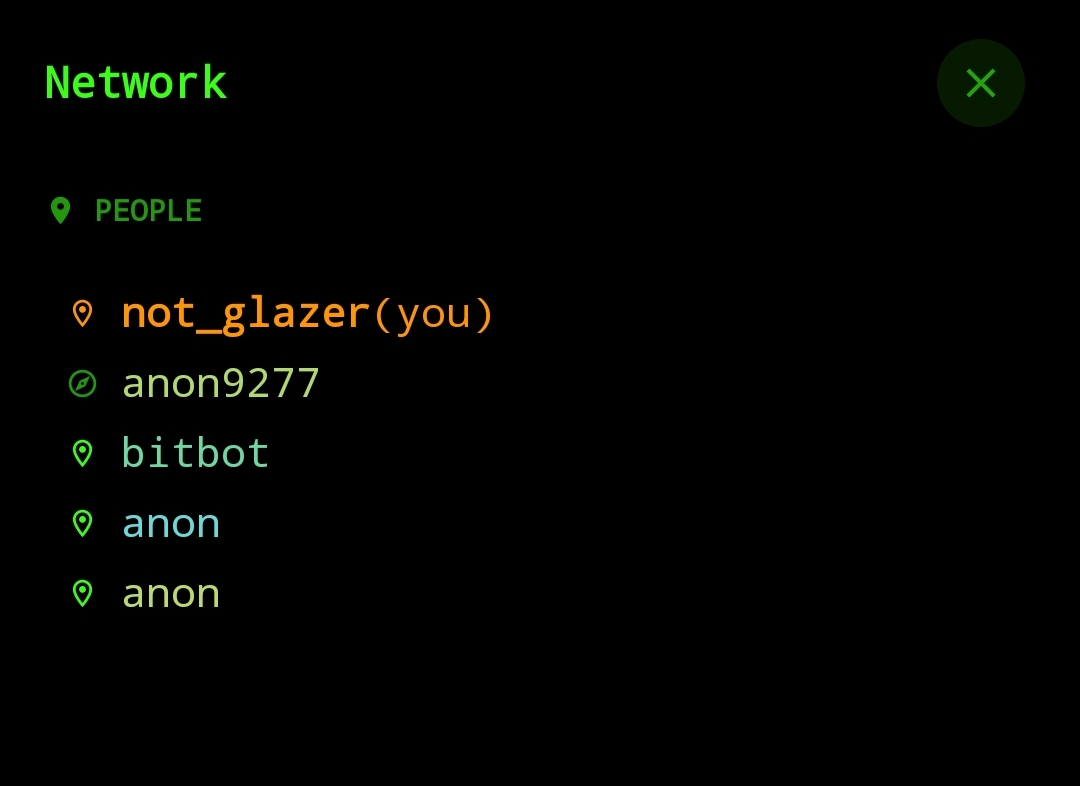
I thought I must first create a presence and then send a message after because that is how @bitbot seem to work based on my anecdote.
This was my resource for investigating the presence:
Apparently, to craft one is like crafting an EVENT from kind 20000 but
contentmust be an empty stringkindmust be20001tagsmust be the specific geohash you want to connect to and nothing else. For example,[["g", "wd"]]
To see this in action. Here is an example of a kind 20001 EVENT
[
    "EVENT",
    "global-bitchat",
    {
        "content":"",
        "created_at":1788886040,
        "id":"a09f58269522d4e2a580ad4fa5d5dabd86f8a3e85e7f0e8f1ccea607b20e351a",
        "kind":20001,
        "pubkey":"30ee0630810734c42a71800d07e7603b41fee68411797faffbc1888d4ded7fbe","sig":"92a530456745e73ae19939081c6bd86c9543d4e6cef3cfdba8158e5db5949827acf08cdc34883562b4033a3ddf346f159cd3358e7c7c1ba6911f6db87bfee943",
        "tags":[
            ["g","sr3k"]
        ]
    }
]
Dynamic pubkey
There is another problem which doesn't solve the main problem but is still worth checking out. When you announce a presence or send a message in BitChat. Your public key (and also private key) changes depending upon the geohash you are in. The only constant is this thing called randomly generated "seed".
Here is what I have gathered from the bitchatexplorer.com API.
wd: bd1a6d06654d69939336a75b2a68ac1abf060884d5cbe13bf6bd2f25dae8a214
st: 677b6bf4fee7bd2b91768ebb2ac2847ec86c84883bc71444d211e256fbc5b44a
st: 677b6bf4fee7bd2b91768ebb2ac2847ec86c84883bc71444d211e256fbc5b44a
dp: 32838c0168418d72b6f518fa57c69f66b019f683e7e00fec57d52776e48f2069
- these messages where sent by me but the public key highly varies
This is my working code: generate_key.py
You can also read more about this from this Deepwiki's documentation of BitChat
Overall, this is how presence (Kind 20001) is suppose to work
At the very least, I tried spamming the geohash presence. It did work sometimes and had sent to BitChat but not the overall solution. It work once, then not, then work again. It working, might just be a coincidence and it's very inconsistent.
The Answer
Just like any question. You just ask. Someone alive. Someone with experience.
I was like reading messages that time (or should I say gosipping), then I came across the geohash #w6, if memory serves right. That is where @RegnumUmbrae and this person @terminal were chatting about the agressive botting problem. @terminal shared his wholesome AI bot named @Fred. The bot seems to be self-hosted because I did not see it anywhere prior to this conversation. The bot, however, miraculously appear in BitChat.
I asked him (non-verbatim), "How can I be able to see your bot in BitChat? I tried working with mine but I did not see mine sending and communicating with the BitChat app..."
And then he dropped the biggest bomb yet...
He said, "Try choosing a local relay..."
LOCAL RELAYYY!!
This must be it!
Kudos to @terminal! He is one of my savior in this seemingly unending suffering. His public key by the way is e8ba471ddd6a4ecbd3933ae1aa76bbf2c6057104f85fa93118e45e2e00000000
@terminal and @6ix are different people which folks commonly misunderstood. @terminal have a different demeanor than @6ix. Well, based on my anecdote they are different people. I can't prove otherwise because we are all anonymous after all. Oh, and by the way, @6ix is the developer of glub.chat (allegedly).
Anyway, back to the relay... I have thought about the relay when I was testing and soft-spamming the #wd geohash channel. The results back then were also inconsistent. I did not know about local relay back then, so... It works once, then other times it did not. So I was guessing during those times that this is not the solution. I underestimated it.
I used wss://relay02.lnfi.network relay back then because I keep seeing it popping up on the BitChat app.
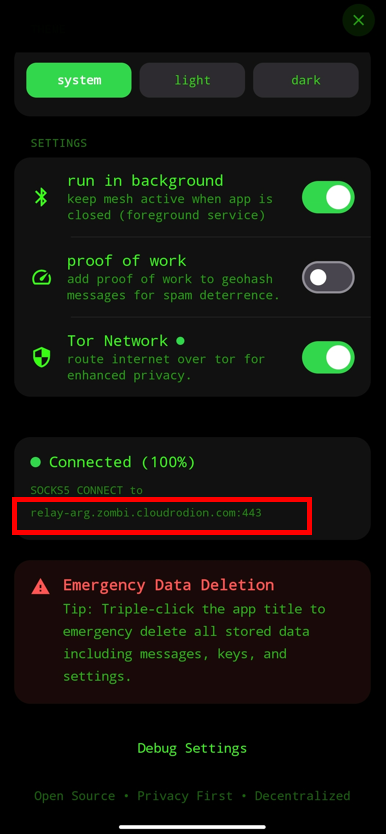
Well, it changes from time to time but whatever relay I see in that specific part of the app, I plug it in the Sender in order to publish in that relay.
Just to be completely clear... Plugging in the values from there would not automatically means that you would be seeing your message in BitChat. Maybe by sheer luck it would work, but most of the time it won't. These, however, shows one of the closest relay from a specific geohash. If you check the map of Nostr relays BitChat uses, that will prove it very well.
With the answer bestowed by @terminal I proceeded to work on implementing it on the Sender I am making.
It recently come to my attention that BitChat developers have a csv file which contains all the relays and their respective latitude and longitude. File is named nostr_relays.csv. Thus, I used it. I copy all of its contents into a csv file also as a form of cache. I could also do a POST request but it's just a waste of resources when there will come a time that there will be no internet. Plus, sending and waiting for a response will be just kinda slow and unproductive.
The next thing I did was make a function that converts a geohash into latitude and longitude, then proceed to calculate the displacement:
where:
- is the displacement
- used for calculating the proximity
- and are for latitude and longitude, respectively
- is for the geohash's latitude and longitude
- is for the Nostr relay's latitude and longitude
I then sort the relays from closest to farthest and use the closest one.
The following are my rendition of it:
class ProximityRelay:
    def __init__(self):
        pass

	def calculate_displacement(self, lat_relay: float, long_relay: float, lat_geohash: float, long_geohash: float) -> float:

		displacement = math.sqrt(((lat_relay - lat_geohash)**2) + ((long_relay - long_geohash)**2))
		return displacement

	def find_closest_relay(self, geohash: str) -> list:
		relay_proximity = {}

		lat_geohash, long_geohash = pygeohash.decode(geohash=geohash)

		with open(BITCHAT_NOSTR_RELAY_PATH, mode='r', newline='', encoding='utf-8') as file:
            dict_reader = csv.DictReader(file)
            for relay in dict_reader:
                    calculated_displacement = self.calculate_displacement(
                                    lat_relay=float(relay["Latitude"]),
                                    long_relay=float(relay["Longitude"]),
                                    lat_geohash=lat_geohash,
                                    long_geohash=long_geohash
                            )

                    relay_proximity[f'wss://{relay["Relay URL"]}'] = calculated_displacement

		relay_proximity_sorted = dict(sorted(relay_proximity.items(), key=lambda item: item[1]))
		list_form_rps = list(relay_proximity_sorted)

		return list_form_rps
You can also visit it here
I returned a list data type so that when that specific relay did not work, then there will be a fallback.
So yeaaah, we fixed the not showing in BitChat problem!
Let's move on in building the features...
Features
For the Bot features I have these in mind:
- Send news from the Philippines
- As this can help regarding in giving an awareness when a crisis arrived or will arrive
- Give a disaster warning. Like that one of National Disaster Risk Reduction and Management Council (NDRRMC) but aggregate by regions.
- Send a message if someone chats within the Philippine vicinity.
- This can help bring awareness that they are connected in the Nostr protocol and not in the Bluetooth mesh (like I first thought) so my fellow Filipinos will not fall for scams asking for their ID, passwords, financial information, etc.
- Publish to relays the channel with frequent chats and how recent, so Filipinos can also join other geohashes at their will. Basically, a frecency model.
- Send a general chat so it will link to these features.
I cannot self-host it, so the bot sends the message in 30-minute intervals with the help of GitHub Actions which I will elaborate further later.
These are one of my flow charts for the bot's features.
News
As for the news, I sourced it from GMA news' RSS feeds. At first I thought, I'll be needing to send a POST request, but thankfully feedparser helped me organize the data. It's like a wrapper that is plug and play and will return a dictionary data-type that I can loop over to get the news, the links, and its details.
Here's the results:
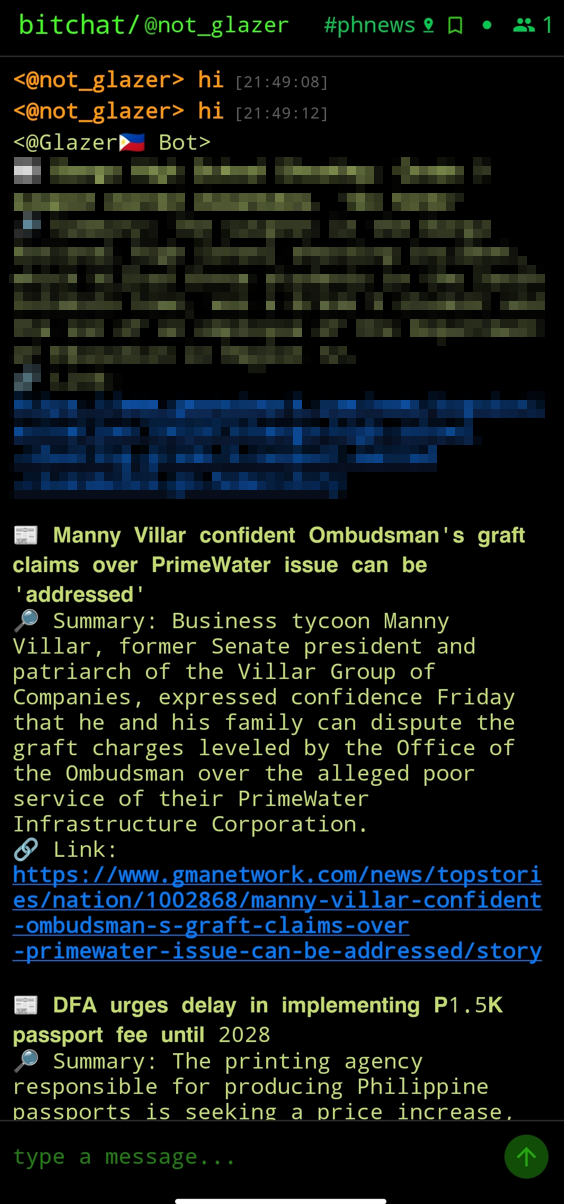
- I redacted the first news because it was a very sensitive one.
The code for this can particularly be found here
Disaster Warning
Like I said, I wanted to make it like that which NDRRMC gives en-masse as an alert when there is a calamity happening or about to happen.
However, I cannot find an API that comes from NDRRMC. I scour through the internet, and then found the government's PAGASA RSS feed. Well, it has some resemblance with the NDRRMC one so I proceed to use the data from the said RSS feed.
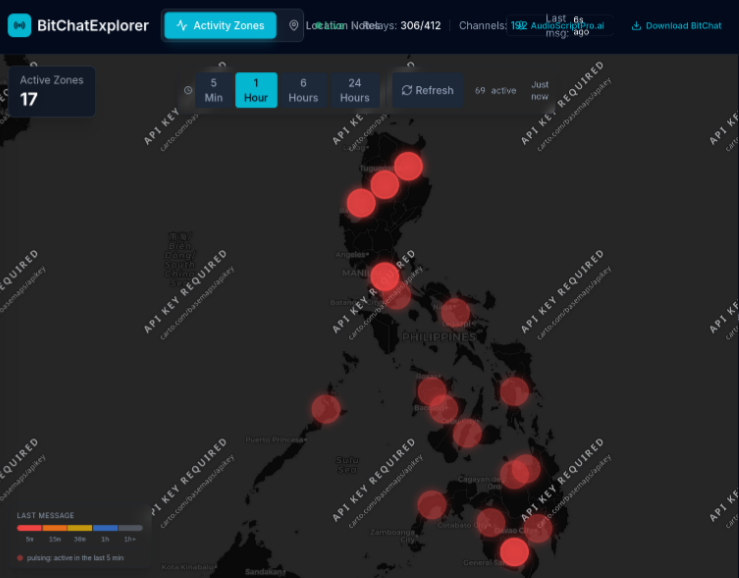
My plan was to send it to every region's geohashes. Hence, I went to the most reliable source: Wikipedia (insert sarcasm). But this source should work anyway, I grabbed the coordinates then manually input the latitude and longituted because I figured it would be way faster than automating it because we only have 18 regions.
Here is my test run of sending message to the regions:
And then, I need to organize the data from the raw PAGASA RSS feeds so I can use it on the bot.
Here is my thought process (or roadmap) for organizing the raw data:
the actual resulting organized data from the PAGASA RSS Feed is like this:
{
    "NCR (National Capital Region)":
        [
            "https://publicalert.pagasa.dost.gov.ph/output/gfa/83d70f31-954f-4663-a142-3b0749ad6006.cap",
            "GFA #5 (Final) - NCR (National Capital Region)",
            "a day ago"
        ],
    "CAR (Cordillera Administrative Region)":
        [
            "https://publicalert.pagasa.dost.gov.ph/output/gfa/3ffce6df-8fb7-48f7-8842-81b553bc4a67.cap",
            "GFA #10 - CAR (Cordillera Administrative Region)",
            "3 hours ago"
        ], ...
}
You can also visit the full implementation of the code here:
The message published by the bot will look like this:
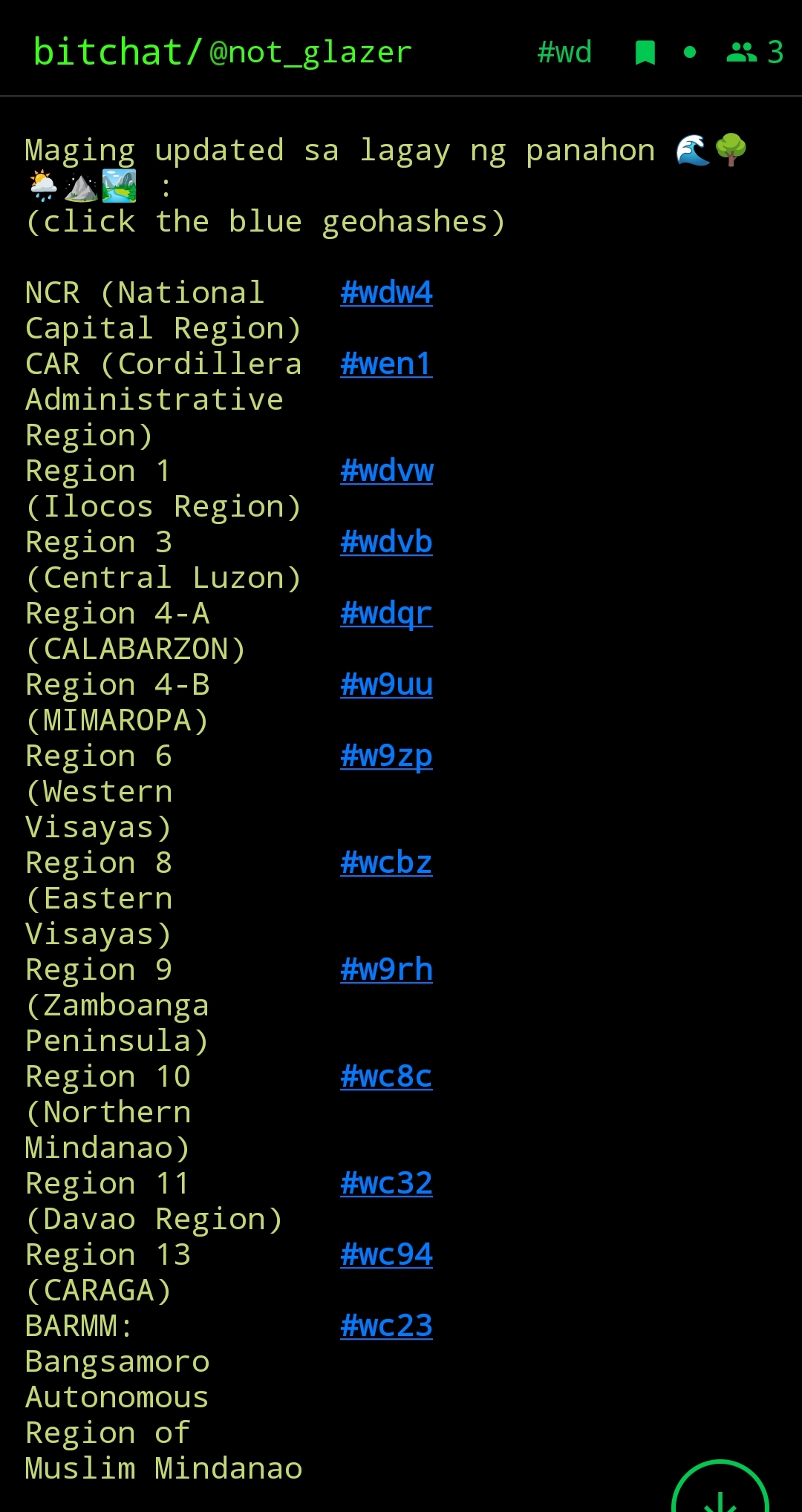
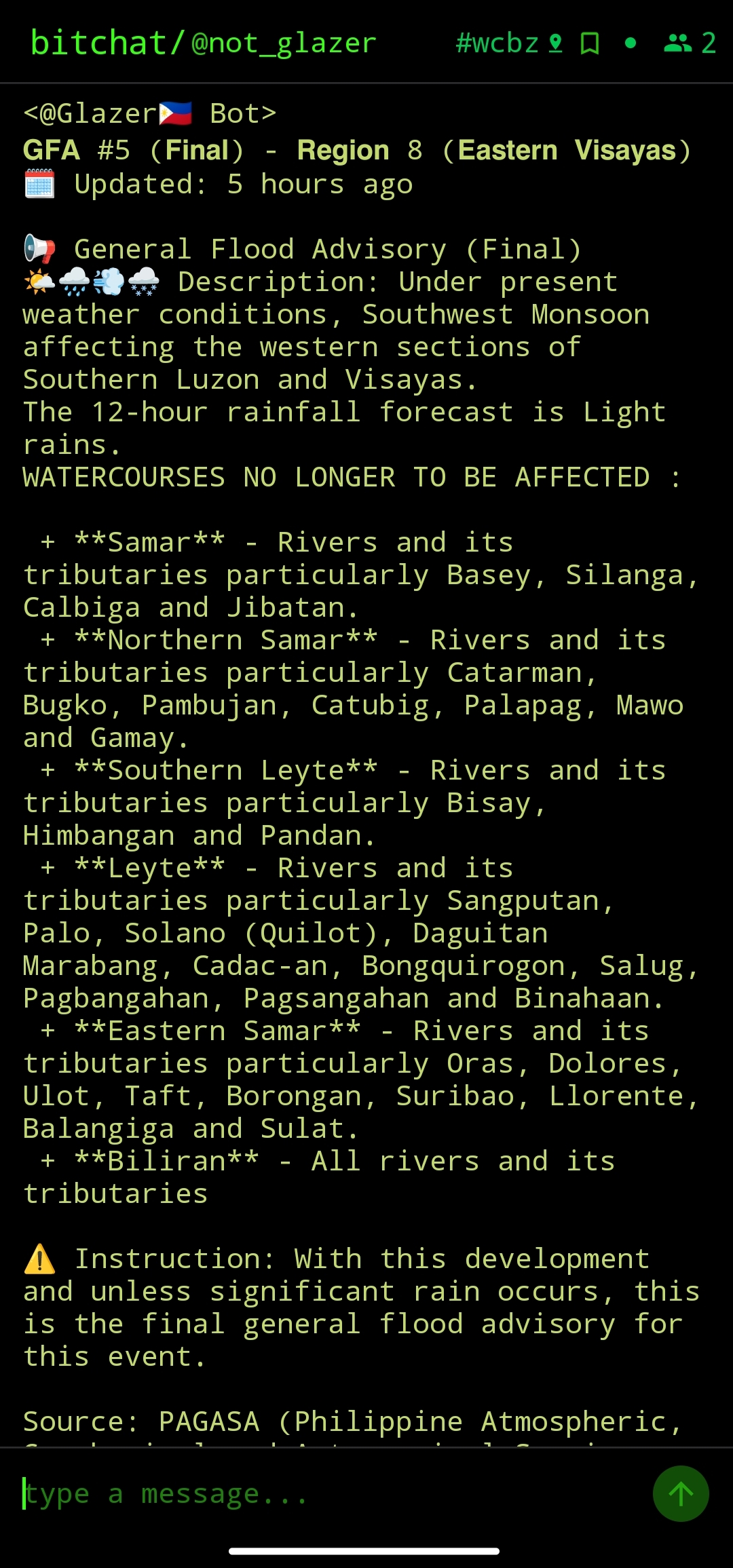
Vicinity Detector
This one was not deployed in GitHub actions but instead a hosting server called Render. I made it into a docker container so that there will be no compatability issue with this free serverless host. What this will do is that it will wait for a message every 1 minute withing the Philippine vicinity and when it detect one, it will send a message.
For the detection, it heavily relies on the data from bitchatexplorer.com API, whereas if the API do not work, it will not run. That is why I am planning to make a Nostr relay listener without depending in this API entirely.
Here is a code
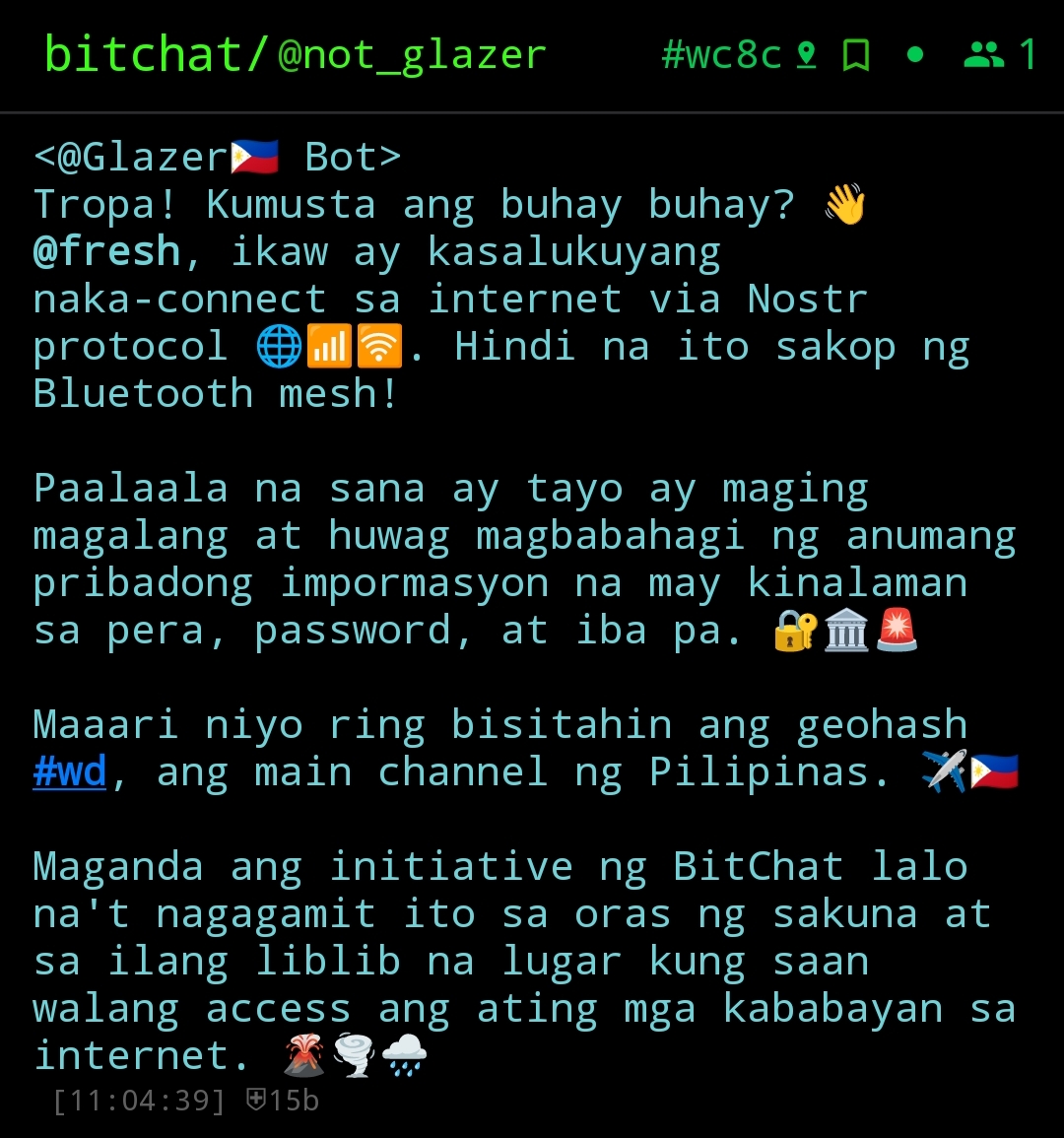
Dang, I even wrote a pronoun detector and list of names to mention without repeating inside a dictionary per geohash! :3
I admit I wrote a ton of emojis, but this is NOT vibe-coded! It is real humam programming skill! Yes, I'm trying to be defensive because I clearly did not vibe-coded this stuff. Even my language is hand-crafted with humor which the AI clearly does not have. Emojis are for aesthetic style because a plain message in BitChat looks "meh" and does not stand out.
The code for this can be found here
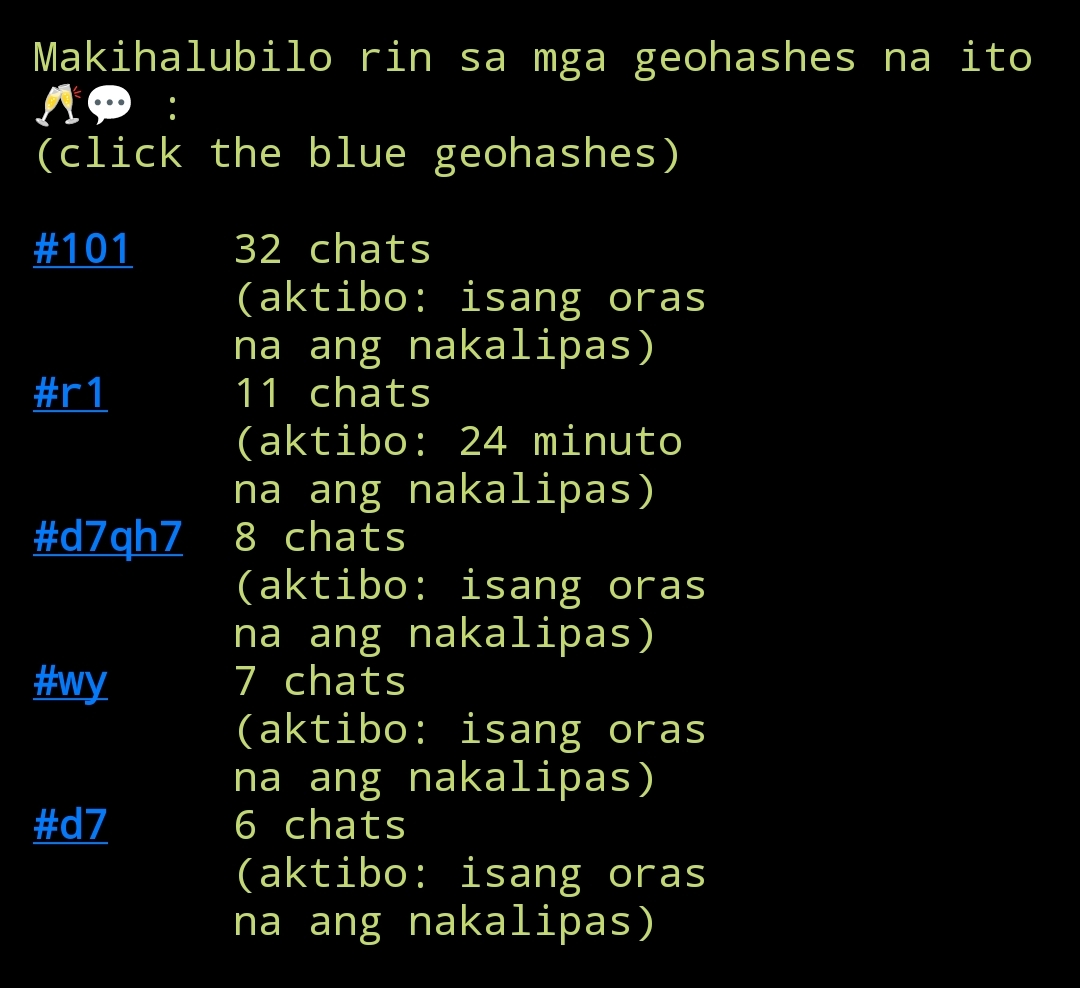
Frecency
This was the first feature I made as a test. I made this so that if people on the main geohash #wd got bored out because there are no people (like most of the time), then they can use visit other geohashes that has the frequent chats and how recent are those chats are so that they won't be disappointed if they were late to the party.
The core logic I applied was this:
I made use of fetching the data from bitchatexplorer.com's API:
[
    {
        "id": "8c9be9b3-d5e0-456a-b353-5b703e037c6e",
        "username": "obama",
        "content": "1",
        "channel": "#1",
        "geohash": "1",
        "location": "",
        "latitude": -67.5,
        "longitude": -112.5,
        "timestamp": "2026-09-10T19:20:37.918Z",
        "messageType": "user",
        "meshPeers": "",
        "hopCount": "",
        "isEncrypted": true,
        "protocolVersion": "2.0",
        "nostrEventId": "000b007a795c3b964e89734dd2b6df077664d981820339c710d32dd1e7c840b4",
        "nostrPubkey": "ed35313ad6b284c6c71de3f0efacfba73be000d0e145f08ce82b0600852ed6ee",
        "dataSource": "bitchat_nostr",
        "sourceRelay": "wss://nostr.whitenode45.ddns.net"
    }
]
Here is the resulting dictionary of me using regex to translate the time from the humanize module
{'#9q': [472, 'isang minuto na ang nakalipas'], '#1': [52, 'isang oras na ang nakalipas'], '#st': [51, 'isang minuto na ang nakalipas'], '#y1fne': [39, 'isang oras na ang nakalipas'], ... }
Finally, this is how this feature looks in actuality:
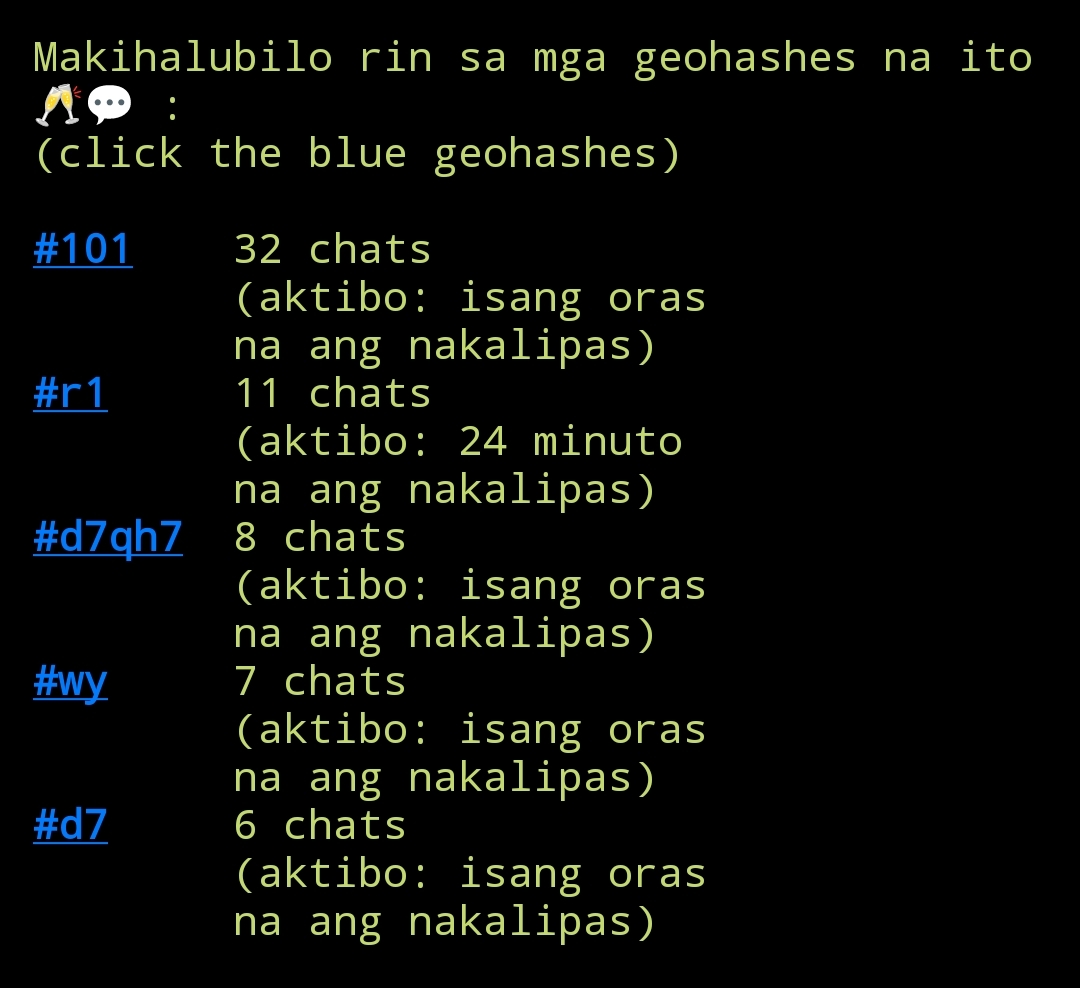
You can see the code for this feature here
General Chat
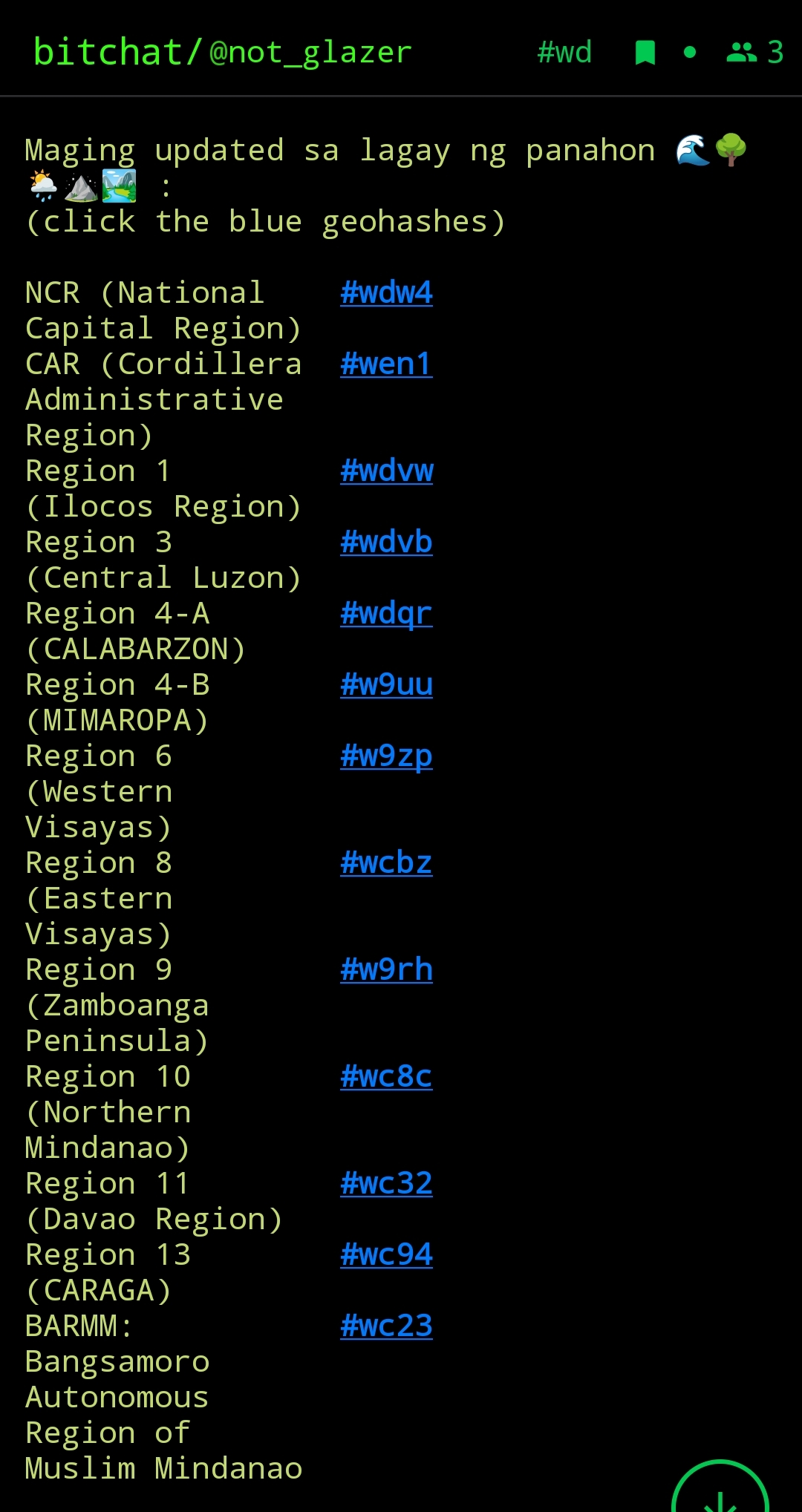
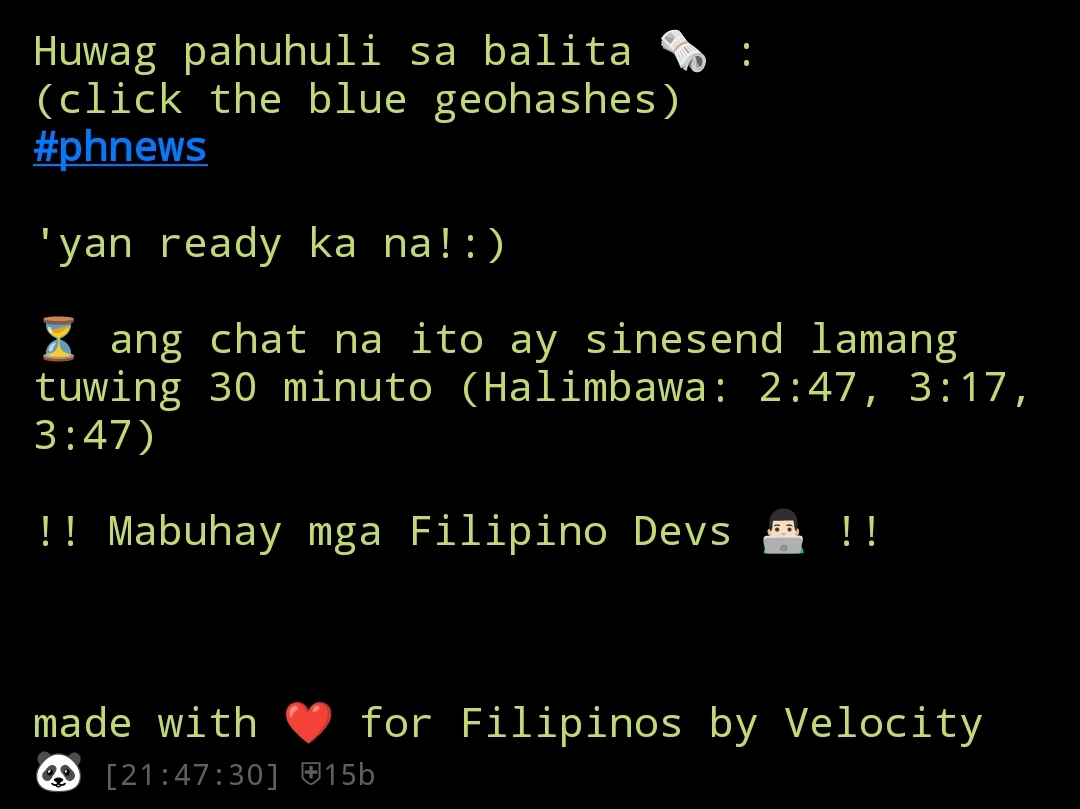
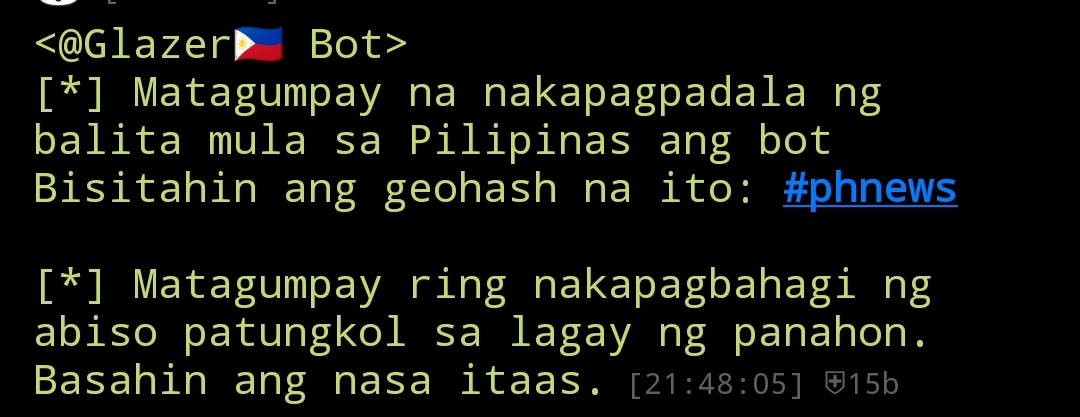
The bot's general chat is just it giving a humorous tip in geohash #wd and it confirming if it had sent the chats from other features. It acts more of like an index.
Here are the screenshots of what the Bot sent:
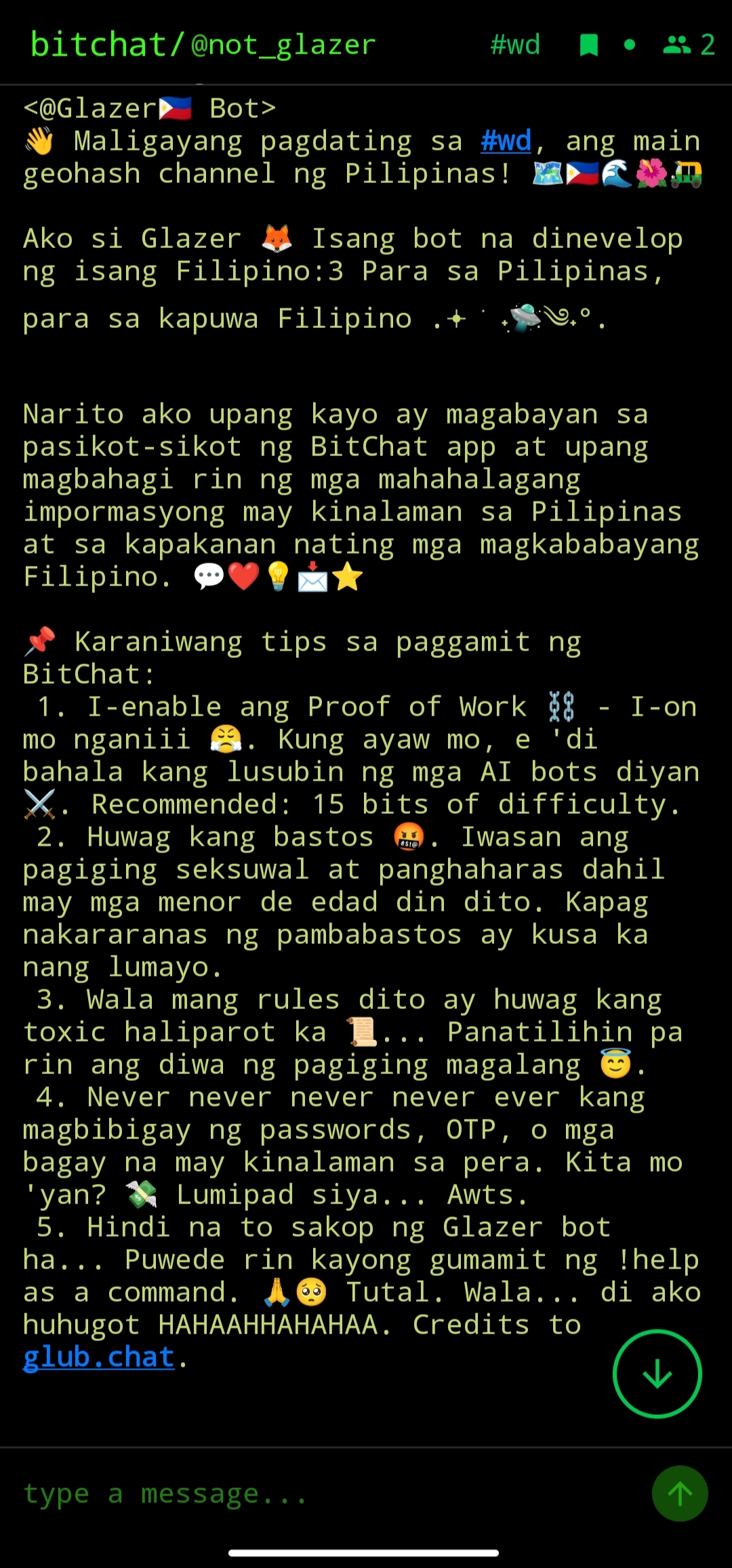
If you wanna know more about intricacies of the code, then visit:
Hosting the Bot
Since I am still a student, I can't just ask my parents to rent a virtual private server. Heck, even hosting it at home because we do not have a Wi-Fi, so I need to be resourceful...
GitHub Actions
This was indeed my plan because I do not have an experience in the Continuous Integration/Continuous Development (CI/CD). Thus, I want to know more.
According to this video titled
Schedule Python Scripts with GitHub Actions FOR FREE | Python Automation, I have to fill my .github/workflow/actions.yml in my git repository with contents. I used this template from the same video as a reference. As for the contents, it will autoamatically run the Python script and push a commit in a specified scheduled time I gave in cron.
Well, at first it got me confused becaue I waited for every 30 minutes and the scheduled task did not run. It was supposed to run in XX:00 and XX:30. Then I changed it into XX:08 and XX:38 because maybe the previous scheduled task was GitHub's high traffic time wherein multiple machines are queued. Well, it still did not work. Keep waiting and nothing
The Fix
What I did was removed the schedule in my actions.yml with:
on:
    workflow_dispatch:
Well, I did not manually run the bot. I used cron-job.org by sending a cURL request through the documentation for workflow_dispatch given by GitHub
So yeah, it now works since I first used GitHub actions up until now...
Render
I tried running it in Render. It works like wonder in the first day and then I got banned the following day in Render for abuse because I used Flask to execute the script. I also tried running it in Hugging Faces but there's no Free tier anymore to deploy docker containers.
Docker
To be completely honest, I do not have any idea in what a Docker is. I heard it and to me it just looks like a whale with a container on its back. Well, that changes when I learned about it in this project.
I watched a tutorial from Coding Sloth and got a glimpse of what it really is. It gets rid of "but it works on my machine?". It is used for complete compatability because of these rampant Linux distros and Windows incompatability.
I made a Dockerfile filled it with contents, install it in my Kali Linux persistence and badabim badabum, it did not work. My machine lags like crazy.
So, I proceeded to use it on Windows. Watched a tutorial called Run Docker in Windows - Setup, Docker Compose, Extensions. I even got myself Windows Subsystem for Linux (WSL). It works!
Then I watched another tutorial titled Docker Tutorial for Beginners - How to Use DockerHub, so I can upload my Docker image in the Docker Hub in order for it to be compatible with Render.
Learned a few docker commands here and there like docker build -t test_dockerz . that you can just basically search on Google that will return an ocean of results.
Conclusion
So um yeah... This blog had been pretty long. I thought it would be just simple, but it is more than what meets the eye. I just wanna acknowledge people, teacher, and mentors who let me stand on their shoulders. And now, ... I made a program that can solve a problem. Well, not really solve but somehow help mitigate possible losses from these disasters and also giving my 'kababayans' an access to information through information (well, not really give but like be like this bridger of the gap). I think there will be more programs that need to be made and it is just a program in a bigger picture. But hey, I contributed my part and will continuously do so. I learned so much from this project, like cryptography, Nostr protocol, Docker, GitHub actions, even used what my teacher taught me in Physics. So yeah, thankful for this project. Adios!